
|
|
Q-Legal
for
| ||||||||||||||||||||||||||||||||||||||||||||||||||
 |
||
|
"I've been using Q-Legal for 20 of the 25 years it has been available. I would say this it's one of my best tools for my day-to-day surveying practice. I have templates setup for the various types of descriptions I am partial to. It is easy to customize and crank out descriptions in seconds." -Richard W. Reid, Jr., Chief of Survey, GM2 Inc.
Registered users of Q-Legal for Land Desktop can email me for special pricing discounts. |
||
|
*** Allows different curve templates for Tangent and non-Tangent curves *** Works with Civil 3D Parcel data *** Includes a user defined phrase library for often used phrases |
|
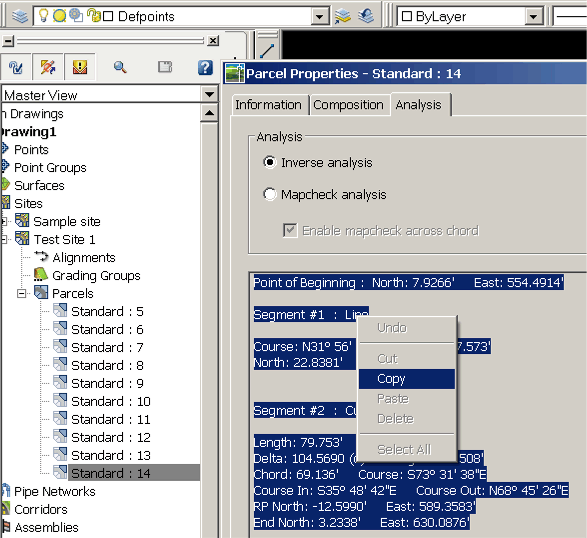
*** Stores and recalls your last set of entered data making subdivisions a breeze. *** Simply right click a parcel name in Civil3D to obtain the data. Your description is written in seconds. |
|
This new version requires nothing more than right clicking a parcel in the Civil3D toolspace. There are no polylines to select, no layers to isolate, no redundant selections to make, no files to search for. You've done the work of creating the parcels. Now let Q-Legal describe them quickly and easily. Important update: Word must be set to "normal" or "draft" viewing mode in order for Q-Legal to function properly. To do so click the View menu and select "normal" or "draft" view mode. |
||
 |
||
|
Q-Legal is a fast, easy to use, prompt driven legal description writer which imports existing Parcel data from Civil 3D into Word. Q-Legal produces descriptions that are 80-90% complete within 1 to 2 minutes with absolute accuracy. Q-Legal eliminates typing mistakes and closure errors by importing data directly from your defined parcels. Q-Legal also provides user-customizable prompts for site-specific data and can be used by any member of your company. Any draftsman, technician or office staff member can import the parcels and write the descriptions with minimal input and no knowledge of AutoCAD or Word is necessary. |
|
|
Features: |
|
|
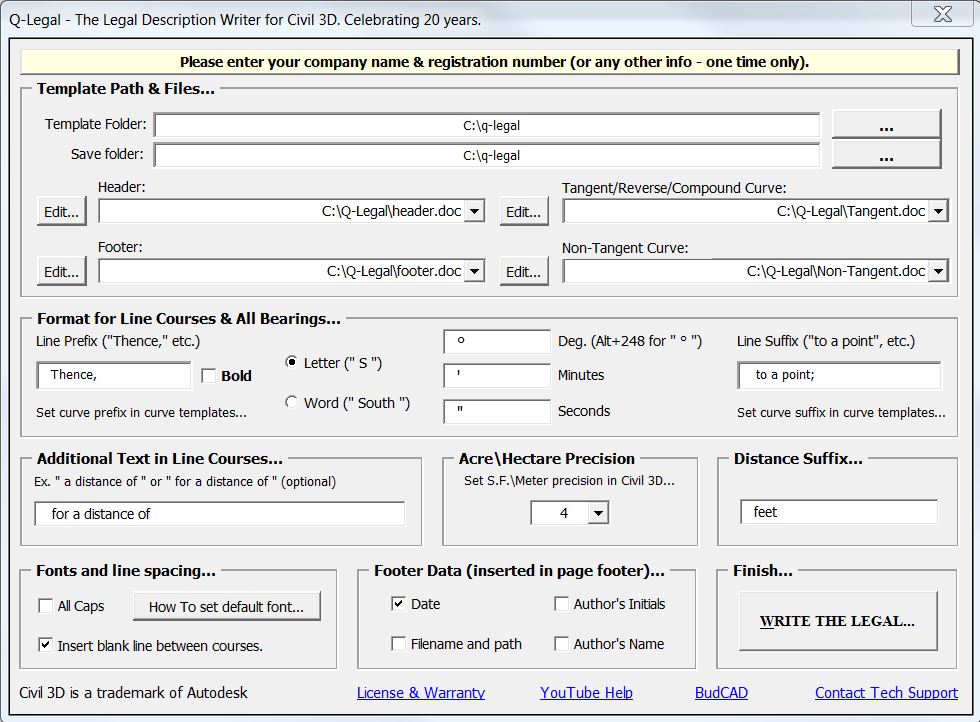
Launch Word and run Q-Legal Change the description POB and even reverse a counter-clockwise parcel all from Word. Show tangency/non-tangency, reverse/compound curvature, radius, arc length, tangent length, direction of curve, central angle, chord bearing and distance and/or 2 radial bearings (P.C. to radius and radius to P.T.). Also you can now use different curve templates for tangent and non-tangent curves... Set and save your own verbiage preferences, quickly create your own user prompts. Q-Legal even has a built in user-customizable phrase library. Add your own often used phrases to a library and insert with a click. |
|
Autodesk Civil 3D Word2010 (or above) |
|
Civil 3D Feature Settings:
|
|
|
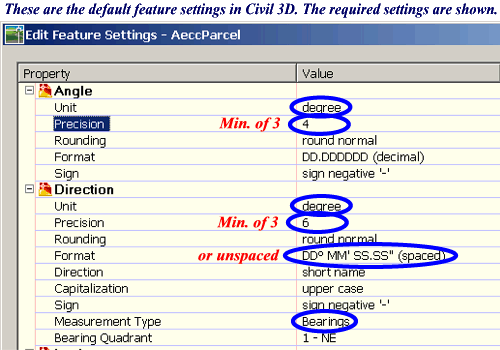
Q-Legal was designed to work with many different feature settings. The defaults will work fine. The following settings must be in place when writing legals with Q-Legal: (click
here for a settings video): You must use DD MM SS.SS (spaced or unspaced) as the bearing format (spaced is the default) The precision for both Angle and Direction must be at least 3 (i.e. nearest second) You must use Degree as the Angle and Direction Unit You must use
Bearings
as the measurement type (the default) You must use either Foot or Meter as the Coordinate unit (foot is the default) Parcel Area unit must Square Feet or Square Meters (NOT Acres/Hectares which are calculated for you) |
 |
Launch Q-Legal
from inside or outside Civil 3D
|
|
|
Q-Legal
can be launched from within Civil 3D, from Word or from the Windows Start
menu. These features allow Q-Legal to utilize the power and speed of the world's most popular Word Processing
software and the World's best Civil/Survey software. |
|
Pricing and Ordering Information: |
|
Single Copy: $99 Site license: $299 |
|
| To
purchase via Credit Card over a secure connection: (BudCAD.com does not receive, collect or store credit card info) Payment is through PayPal but membership is not required (to avoid logging in select "Debit or Credit Card" after clicking the link below) |
|
 (Unlimited installs at any one physical location) (Unlimited installs at any one physical location)
|
|
Downloads include 2 sample curve templates, sample header & footer templates, read me file, AutoCAD menu and registration form. Downloads run unrestricted for 10 days (all you need is a password for continued use...). |
Download Q-Legal for Civil3d(full version free for 10 days) |
| To install: unzip to a temporary folder and run Setup.exe (see readmefirst.doc in the zip for complete instructions). |
| NOTE: Due to Windows security changes it is recommended to install Q-Legal to the Default install folder "C:\Q-Legal" (or folder of your choosing outside the "Program Files" folders). That allows editing of the templates and phrase library directly without Windows read-only issues. |
|
AutoCAD, Land Desktop and Civil 3D are trademarks of Autodesk. All other products mentioned are registered trademarks or trademarks of their respective companies. Questions or problems should be directed to Webmaster@BudCAD.com. Copyright 2000-2025. All rights reserved. |


 Fully Functional Downloads: